Building IoT Device Clients in Swift with TinyTBDeviceClient
As I work a lot in the field of IoT, I recently experimented with Swift on a Raspberry Pi. I also wanted to use it as a client device pushing telemetry data to my ThingsBoard server.
Instead of reaching for Python as usual, I wanted to explore whether Swift could serve as a serious IoT device language on Linux. That led me to evaluate mqtt-nio, where I implemented a device client that supports the most common ThingsBoard device features:
- Connect / Disconnect
- Reconnect on connection loss (🎉 new since version 0.0.4)
- Push Telemetry / Subscribe to topics
- Listen and respond to RPCs (e.g. initiated through buttons and switches on a Dashboard)
While mqtt-nio is a powerful and flexible MQTT implementation, it is intentionally generic. When working specifically with ThingsBoard devices, a lot of boilerplate logic repeats across projects, such as telemetry topics, attribute subscriptions, RPC handling, TLS configuration, etc. To make my life easier for future IoT projects, I put this into a Swift PM library I’d describe like this:
TinyTBDeviceClient is a minimal, pragmatic MQTT client written in Swift and built on top of mqtt-nio. It is pre-configured for ThingsBoard device connectivity and secure by default through mandatory TLS and CA pinning. It handles the common tasks such as publishing telemetry messages (time-series data), subscribing to topics (e.g. attribute changes), and handling RPC requests. The goal is to reduce the complexity of MQTT when integrating IoT devices with ThingsBoard, offering a more focused and manageable approach.
The library is intentionally small and focused – it is not a general-purpose MQTT abstraction layer.
📝 Resources
- Library on GitHub: TinyTBDeviceClient
- Library Documentation: TinyTBDeviceClient Docs
- Sample implementation making use of this library: TinyTBDeviceClient-Example
💻 Quick Facts
- Tiny MQTT client library, designed for IoT client devices working with ThingsBoard
- Built on top of mqtt-nio (SwiftNIO)
- Pre-configured for ThingsBoard server connectivity
- TLS enforced by default, requires CA pinning
- Runs on macOS, iOS, Linux (successfully tested on Raspberry Pi), and anywhere nio-mqtt is supported
🛫 Sample Implementation
For my own references, I coded a sample implementation making use of the above described functionality which is now part of the swift package. You can find the sources here: TinyTBDeviceClient-Example
The sample implementation mainly consists of two files showcasing the library’s features and functionality (and a third helper file that is loading the MQTT credentials from a file):
- main.swift
- RPCMessageProcessor.swift
- ConfigLoader.swift (the helper file)
Both files are shown here for convenience (we skip the third one as this is not really demonstrating library-specific features):
main.swift
//
//  TinyTBDeviceClient_Example.swift
//  TinyTBDeviceClient_Example
//
//  Created by Johannes Kinzig on 06.02.26.
//


import TinyTBDeviceClient
import NIO
import Foundation
import Logging


// MARK: - MQTT Client related
var client: TinyTBDeviceClient
let eventLoopGroup: EventLoopGroup = MultiThreadedEventLoopGroup(numberOfThreads: 1)
let eventLoopGroupNioProvider: NIOEventLoopGroupProvider = .shared(eventLoopGroup)
let logger = Logger(label: "TinyTBDeviceClient")
let rpcTopics: [String] = ["v1/devices/me/rpc/request/+"]
let telemetryTopic: String = "v1/devices/me/telemetry"

let clientCredentials: MQTTClientCredentials = ConfigLoader(searchPath: "Credentials", logger: logger).loadClientCredentialsFromFile(fileName: "credentials.json")!

do {
    client = try TinyTBDeviceClient(
        host: clientCredentials.host,
        port: clientCredentials.port,
        clientId: clientCredentials.clientId,
        caCertPath: clientCredentials.caCertPath,
        username: clientCredentials.username,
        password: clientCredentials.password,
        eventLoopGroupProvider: eventLoopGroupNioProvider,
        logger: logger
    )
} catch {
    fatalError("Unable to initialize client: \(error)")
}

RPCMessageProcessor.eventLoop = eventLoopGroup.next()
RPCMessageProcessor.telemetryTopic = telemetryTopic
RPCMessageProcessor.mqttClient = client

client.registerMessageListener(named: "RPC Listener") { message, topic in
    print("Received message with payload \(message) for topic \(topic)")
    RPCMessageProcessor.process(message: message, topic: topic)
}

// Auto-reconnect is new and requires version >= 0.0.4
client.enableAutoReconnect(onReconnect: { print("🔄 Reconnected") })

client.connect(
    onSuccess: {
        print("✅ Connected (CA pinned)")
        client.subscribe(
            to: rpcTopics,
            onSuccess: { topic, subAck in
                print("✅ Subscribed to \(topic) with \(subAck)")
            },
            onError: { error in
                print("❌ Subscribe failed:", error)
            }
        )
    },
    onError: { error in
        print("❌ Connection failed:", error)
        exit(1)
    }
)


// MARK: POSIX Signals related
let sigintSource = DispatchSource.makeSignalSource(signal: SIGINT, queue: .main)
let sigtermSource = DispatchSource.makeSignalSource(signal: SIGTERM, queue: .main)

sigintSource.setEventHandler { handle(signal: SIGINT) }
sigtermSource.setEventHandler { handle(signal: SIGTERM) }

sigintSource.resume()
sigtermSource.resume()

// MARK: Signal handling

/// Handle received signal
///
/// In this simplified case, disconnect and shut down
func handle(signal: Int32) {
    print("Received signal \(signal).")

    sigintSource.cancel()
    sigtermSource.cancel()

    do {
        client.disconnect()
        try eventLoopGroup.syncShutdownGracefully()
        print("EventLoopGroup shut down.")
    } catch {
        print("Shutdown error: \(error)")
    }
    exit(0)
}

print("PID: \(getpid())")
dispatchMain()
RPCMessageProcessor.swift
//
//  RPCMessageProcessor.swift
//  MQTTTBClientImpl
//
//  Created by Johannes Kinzig on 04.02.26.
//

import TinyTBDeviceClient
import Foundation
import NIO


struct RPCCommand: Codable {
    let method: String
    let params: [String: Int]?
}

/// Simple message processor to evaluate RPC messages received from the IoT Cloud
enum RPCMessageProcessor {

    static var eventLoop: EventLoop?
    static var mqttClient: TinyTBDeviceClient?
    static var telemetryTopic: String?
    static var scheduledTelemetryPushTask: RepeatedTask?

    /// Processes an incoming RPC message from the IoT Cloud.
    ///
    /// The function expects a UTF-8 encoded JSON string that decodes into `RPCCommand`.
    /// It attempts to parse the message and dispatches handling based on the
    /// `method` and `params` contained in the payload. Currently supports the
    /// `getRandom` method with a `number` parameter.
    ///
    /// - Parameters:
    ///    - message: A JSON string representing the RPC command. Example: `{"method":"getRandom","params":{"number":1}}`
    ///    - topic: Topic the message was published under
    ///
    /// - Note: On unknown methods/parameters or failures, the function logs details
    ///   to the console using `print` and does not throw.
    static func process(message: String, topic: String? = nil) {
        do {
            // Parse the JSON string into your command model
            guard let data = message.data(using: .utf8) else {
                print("Failed to convert message string to data")
                return
            }
            let rpcCommand = try JSONDecoder().decode(RPCCommand.self, from: data)

            switch rpcCommand.method {

            // Method: getRandom
            case "getRandom":
                guard let number = rpcCommand.params?["number"] else {
                    print("⚠️ Missing 'number' parameter for method \(rpcCommand.method)")
                    return
                }
                switch number {
                case 1:
                    self.publishNo1Telemetry()
                case 2:
                    self.publishNo2Telemetry()
                default:
                    print("⚠️ Unsupported 'number' value: \(number)")
                }

            // Method: runScheduler
            case "runScheduler":
                guard let enable = rpcCommand.params?["enable"] else {
                    print("⚠️ Missing 'number' parameter for method \(rpcCommand.method)")
                    return
                }
                switch enable {
                case 0:
                    Self.stopScheduledTelemetryPushTask()
                case 1:
                    Self.startScheduledTelemetryPushTask()
                default:
                    print("⚠️ Unsupported 'enable' value: \(enable)")
                }

            // Method: schedulerIsRunning
            case "schedulerIsRunning":
                guard let topic = topic else { return }
                Self.mqttClient?.respondToRPCRequest(rpcRequestTopic: topic, responseMessage: "\(scheduledTelemetryPushTaskIsRunning)")

            default:
                    print("Unknown method: \(rpcCommand.method)")
            }
        } catch {
            print("Failed to decode RPC command: \(error)")
        }
    }


    // MARK: - Private Functions

    /// Publish telemetry: random number 1
    static private func publishNo1Telemetry() {
        guard let telemetryTopic = self.telemetryTopic else {
            return
        }
        publishTelemetry(message: #"{"random1": \#(getRandomNumber(min: 0, max: 500))}"#, topic: telemetryTopic)
    }

    /// Publish telemetry: random number 2
    static private func publishNo2Telemetry() {
        guard let telemetryTopic = self.telemetryTopic else {
            return
        }
        publishTelemetry(message: #"{"random2": \#(getRandomNumber(min: 501, max: 999))}"#, topic: telemetryTopic)
    }

    /// Publish telemetry: random number 3
    static private func publishNo3Telemetry() {
        guard let telemetryTopic = self.telemetryTopic else {
            return
        }
        publishTelemetry(message: #"{"random3": \#(getRandomNumber(min: 1000, max: 1500))}"#, topic: telemetryTopic)
    }

    /// Publishes telemetry data to the specified MQTT topic.
    ///
    /// This method uses the configured MQTT client to publish a message
    /// to the given topic. It handles both success and error cases,
    /// logging appropriate messages to the console.
    ///
    /// - Parameters:
    ///   - message: The JSON string containing telemetry data to publish
    ///   - topic: The MQTT topic to which the message should be published
    ///
    /// - Note: This method relies on a shared `mqttClient` instance that must
    ///   be configured before calling this function. If the client is not set,
    ///   no message will be published.
    static private func publishTelemetry(message: String, topic: String) {
        Self.mqttClient?.publish(
            message: message,
            to: topic,
            onSuccess: { print("📤 Telemetry published: \(message)") },
            onError: { error in
                print("❌ Telemetry publish failed: \(error)")
            }
        )
    }


    /// Return a random integer between a minimum and a maximum boundary
    /// - Parameters:
    ///   - min: Minimum boundary
    ///   - max: Maximum boundary
    /// - Returns: Random number between boundaries
    static private func getRandomNumber(min: Int = 0, max: Int = 1000) -> Int {
        return Int.random(in: min...max)
    }


    /// Starts a scheduled telemetry push task that publishes random number
    /// telemetry data at regular intervals.
    ///
    /// This function creates a repeating task that publishes telemetry
    /// data containing random number 3 to the configured MQTT topic.
    /// The task runs at 1-second intervals and can be stopped using
    /// `stopScheduledTelemetryPushTask()`.
    ///
    /// The function cancels any existing scheduled task before creating
    /// a new one to prevent multiple simultaneous tasks from running.
    ///
    /// See also: `stopScheduledTelemetryPushTask()`, `scheduledTelemetryPushTaskIsRunning`
    ///
    /// - Note: This function requires `eventLoop` and `mqttClient` to be configured
    ///   before it can function properly. If either is not set, the task will not be created.
    ///
    /// - Important: The task publishes data using `publishNo3Telemetry()` which
    ///   generates telemetry with a random number between 1000 and 1500.
    private static func startScheduledTelemetryPushTask() {
        // Cancel any existing task first
        Self.stopScheduledTelemetryPushTask()

        // Schedule the repeating task - using the correct syntax for Swift on Linux
        Self.scheduledTelemetryPushTask = Self.eventLoop?.scheduleRepeatedTask(initialDelay: .seconds(0), delay: .seconds(1)) { _ in
            Self.publishNo3Telemetry()
        }
    }

    /// Stops any currently running scheduled telemetry push task.
    ///
    /// This function cancels the existing repeating task that publishes random number
    /// telemetry data at regular intervals. If no task is currently running, this function
    /// has no effect.
    ///
    /// The function clears the `scheduledTelemetryPushTask` property, effectively stopping
    /// any further executions of the scheduled task.
    ///
    /// See also: `startScheduledTelemetryPushTask()`, `scheduledTelemetryPushTaskIsRunning`
    ///
    /// - Note: This function is intended for internal use only and should not be called
    ///   directly from outside this module.
    private static func stopScheduledTelemetryPushTask() {
        Self.scheduledTelemetryPushTask?.cancel()
        Self.scheduledTelemetryPushTask = nil
    }

    /// Indicates whether the scheduled telemetry push task is currently running.
    ///
    /// This computed property returns 1 if a scheduled telemetry push task
    /// is currently active, or 0 if no such task is running.
    ///
    /// The value is determined by checking whether the `scheduledTelemetryPushTask`
    /// property contains a valid task reference.
    ///
    /// - Returns: 1 if the scheduler is running, 0 otherwise
    ///
    /// Example:
    /// ```swift
    /// // Check if scheduler is running
    /// let running = "\(scheduledTelemetryPushTaskIsRunning)"
    /// ```
    ///
    /// See also: `startScheduledTelemetryPushTask()`, `stopScheduledTelemetryPushTask()`
    static var scheduledTelemetryPushTaskIsRunning: Int {
        return (Self.scheduledTelemetryPushTask != nil) ? 1 : 0
    }
}
Giving the sample implementation a nice GUI
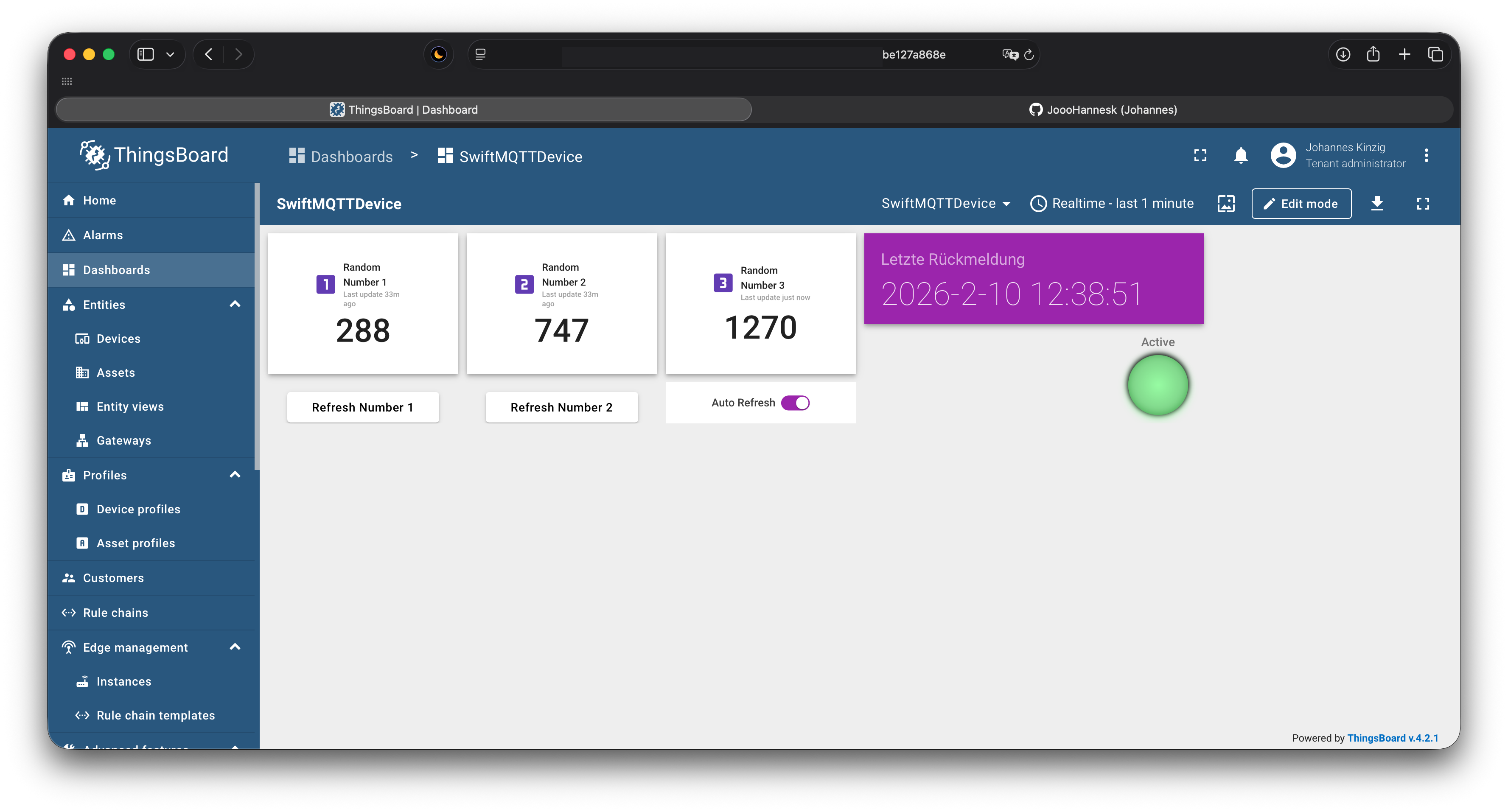
To showcase the MQTT clients functionality, I created a dashboard on my ThingsBoard tenant which displays three different random numbers, each published by the client device. Random number one and two can be updated by pushing the corresponding buttons, random number three gets updated automatically when activated through the switch.
Follow the steps in the documentation to get started.
🔐 SSL / TLS
In case you need to set up your own PKI for your MQTT or ThingsBoard server, look at the related post on my blog: Building a Secure PKI for MQTT using OpenSSL
📬 Stay in the loop?
If you’d like to stay up to date with future technical guides and project insights, subscribe to my newsletter. I share practical knowledge, lessons learned, and updates – no spam, just content for developers and engineers.